
Smyle Labs Inhaler 510 Cartridge Battery Manual
Posted by VapeBatt on Jul 27th 2026
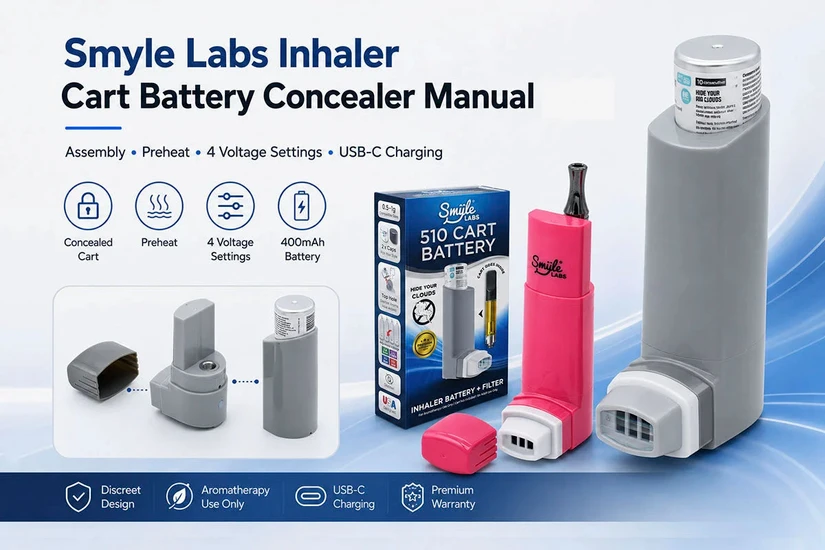
Penjamin Inhaler Cart Concealer Manual
Learn how to assemble, charge and operate the Smyle Labs Inhaler, including its 400 mAh battery, cartridge preheat mode, four adjustable voltage settings and removable personal cloud filter.

Product Overview
The Smyle Labs Inhaler is a rechargeable 510-thread cartridge discreet battery housed inside an inhaler-style outer shell. Its cartridge chamber is designed to cover many compatible cartridges while providing adjustable voltage, push-button activation, cartridge preheat and USB-C charging.
The internal battery has a capacity of 400 mAh. The kit also includes short and long cartridge covers, removable filters and protective filter caps.

Main Features and Package Contents
Main Features
- 400 mAh rechargeable battery
- Universal 510-thread connection
- Four adjustable voltage settings
- Cartridge preheat function
- Push-button activation
- Concealed cartridge chamber
- Short and long cartridge covers
- Removable personal cloud filter
- USB-C charging port
- Color-coded LED indicator

Package Contents
- Smyle Labs Inhaler battery base
- Short cartridge cover
- Long cartridge cover
- Two top caps
- Two replaceable cloud filters
- Two filter caps
- Quick-start guide
- Warranty information

Getting to Know the Device
Battery Base
- Standard 510-thread battery
- Power and activation button
- Color-coded LED indicator
- USB-C charging port
- Removable rubber charging-port cover
- Front opening for the removable filter
Outer Cartridge Cover
The outer cover slides over the attached cartridge. The included short and long covers help accommodate different cartridge heights.
Filter and Mouthpiece
The removable filter fits inside the front opening and functions as the inhalation mouthpiece. It may also be used as a personal filter when exhaling through the device.
LED Indicator
The LED communicates the selected voltage, power status, preheat activity and other operating feedback.

Charging the 400 mAh Battery
- Locate the rubber cover near the bottom of the battery.
- Lift the cover gently to expose the USB-C charging port.
- Connect a compatible USB-C cable to the device.
- Connect the other end to a standard USB power source.
- Allow the 400 mAh battery to charge fully.
- Disconnect the cable when charging is complete.
- Close the rubber cover to protect the charging port.

Cartridge Compatibility
This cartridge battery uses a standard 510-thread connection and is intended to fit many cartridges between approximately 0.5 g and 1.0 g. Actual fit depends on the cartridge’s physical dimensions.
Compatibility may vary according to:
- Cartridge height
- Cartridge diameter
- Mouthpiece shape
- Base and thread design
- Cartridge airflow placement

Assembly Instructions
- Hold the battery securely and slide the outer inhaler cover upward and away from the battery base.
- Inspect the 510 connection and confirm that it is clean, dry and free of residue.
- Position a compatible cartridge above the connection and turn it clockwise until it is secure.
- Stop tightening as soon as the cartridge makes electrical contact.
- Select the short or long outer cover according to the cartridge height.
- Slide the selected cover over the cartridge and onto the battery body.
- Remove the filter cap and insert the removable filter into the front opening.

Button Controls
Press the button five times rapidly to power the battery on. Repeat the same five-click sequence to turn it off.
Turn the battery off before removing the cartridge, cleaning the device or carrying it in a pocket or bag.
Four Variable Voltage Settings
Press the power button three times rapidly to cycle through the four available settings. The LED color identifies the selected voltage.

Using the Preheat Function
Preheat gently warms the cartridge before a draw. It can be useful when the oil is cold, unusually thick or causing restricted airflow.
- Make sure the battery is powered on.
- Press the power button twice rapidly.
- The LED should illuminate or pulse during the preheat cycle.
- Allow the cycle to finish before taking a slow draw.
- Press the button once to stop preheating early when necessary.
When Preheat May Help
- The cartridge has been stored in a cold location.
- The oil is especially thick.
- Airflow feels partially restricted.
- The cartridge initially produces little vapor.
- The oil has settled away from the intake openings.
How to Use the Inhaler Discreet Battery
- Confirm that the cartridge and outer cover are installed correctly.
- Power the device on with five rapid clicks.
- Select the desired voltage with three clicks.
- Use one preheat cycle when the cartridge requires warming.
- Remove the protective filter cap.
- Place your lips around the filter or mouthpiece opening.
- Press and hold the power button.
- Inhale slowly and steadily.
- Release the button before completing the draw.
- Allow the cartridge to rest briefly between draws.

Using the Personal Cloud Filter
The removable filter may be used when exhaling through the device to reduce the visible cloud.
- Complete the draw and release the power button.
- Position the filter comfortably.
- Exhale slowly through the filter opening.
- Avoid forcing an excessively strong exhale through it.
- Replace the filter when airflow becomes restricted.

Cleaning and Maintenance
510 Connection
- Turn the battery off.
- Remove the cartridge.
- Wipe the thread and center contact with a dry cotton swab.
- Use a lightly alcohol-dampened swab only for stubborn residue.
- Allow the connection to dry completely before reassembly.
Outer Cover
- Wipe with a soft, slightly damp cloth.
- Dry completely before reinstalling.
- Do not immerse the cover or battery in liquid.
Filter Area
- Remove the filter before cleaning the opening.
- Use a dry cotton swab to remove debris.
- Replace a clogged or saturated filter.
USB-C Port
- Disconnect the charger before cleaning.
- Use a dry, soft brush to remove dust.
- Never insert metal tools into the charging port.
- Close the rubber cover after charging.
Troubleshooting
| Problem | Possible Solution |
|---|---|
| Device does not turn on | Press the button five times rapidly, recharge the battery and check that the button is not obstructed. |
| No vapor | Confirm power, clean the 510 contacts, reinstall the cartridge gently, try preheat and test another compatible cartridge. |
| Weak vapor | Recharge the 400 mAh battery, increase voltage one level, use preheat once and inspect the cartridge for airflow restriction. |
| Burnt taste | Reduce the voltage, shorten the draw, allow more rest time and check whether the cartridge is nearly empty. |
| Outer cover does not fit | Try the other cover length, confirm the cartridge is fully threaded and do not force unusually wide cartridges. |
| Restricted filter airflow | Inspect the front opening and replace the removable filter. |
| Battery will not charge | Open the rubber cover completely, try another USB-C cable and inspect the port for dust or damage. |
Safety Information
- Intended only for adults of legal vaping age.
- This product is not a medical inhaler or medical device.
- Keep away from children and pets.
- Use only compatible 510-thread cartridges.
- Do not use cracked, damaged or leaking cartridges.
- Do not expose the battery to water or extreme temperatures.
- Do not puncture, crush, open or modify the battery.
- Never leave the device charging unattended.
- Keep the charging port clean and dry.
- Stop using the device if it becomes unusually hot, swollen or damaged.
- Follow all applicable laws and cartridge-manufacturer instructions.

Quick Operating Reference
5 clicks: Power on or off
2 clicks: Start preheat
3 clicks: Change voltage
Press and hold: Activate the cartridge
Voltage order: Green 2.2 V → Purple 2.7 V → Blue 3.1 V → Red 3.6 V